
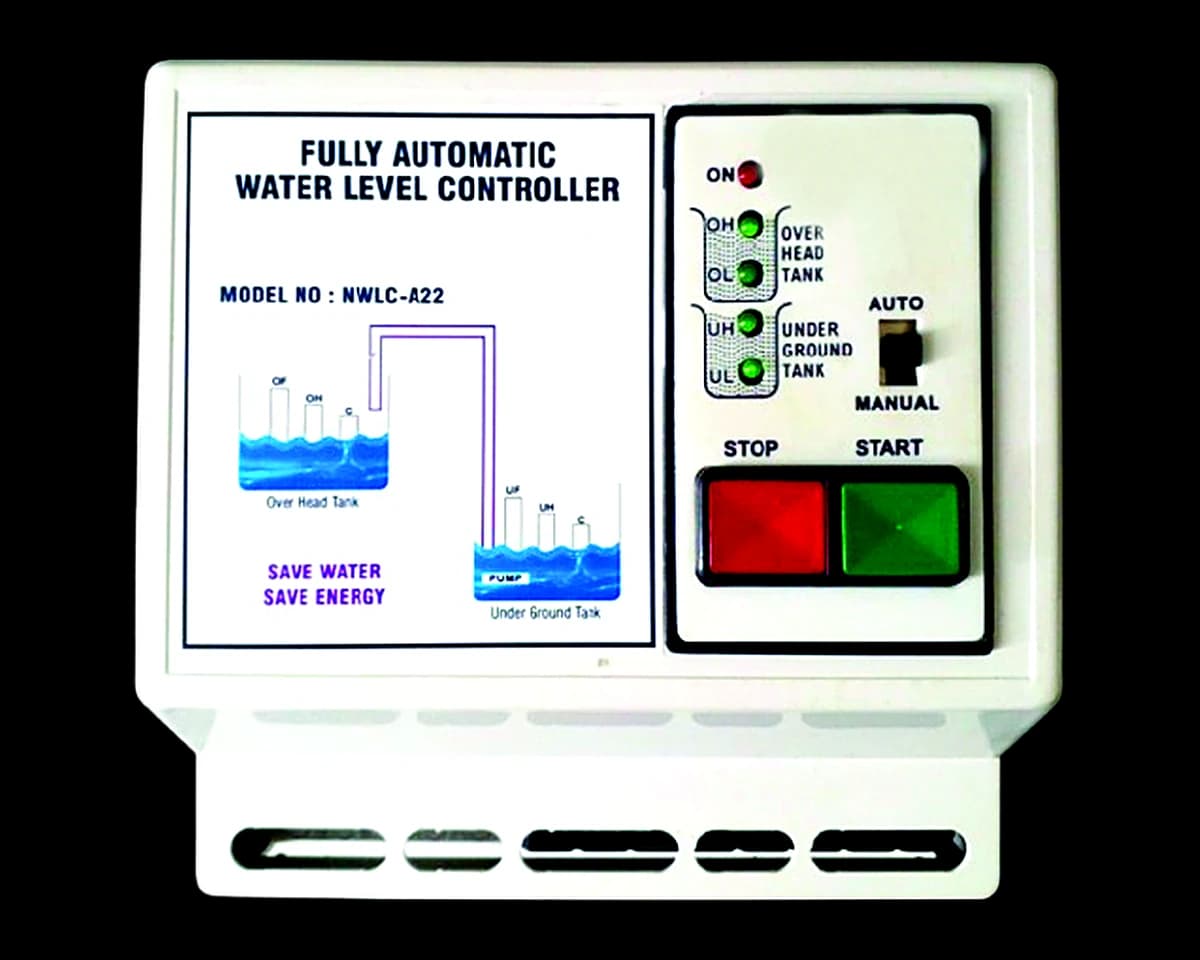
Fully Automatic Water Level Controller for Push-Button Starter Panel
Installation guide, manuals, wiring diagrams, videos and troubleshooting.
Electrical work: use a licensed electrician
1Product overview
Suitable for single-phase push-button starter panels — panels with one green button to start the motor and one red button to stop it.
When the overhead tank level becomes low (water drops below the middle sensor) and there is water in the underground tank or sump, the motor starts automatically and the tank fills. When the water reaches the high level, the motor switches off automatically: AUTO OFF when the tank is full or the sump is empty. Dry-run protection means it only starts the motor if water is present in the sump.
Auto and manual mode switch: in auto mode the motor starts and stops automatically; in manual mode you start and stop it with the controller's buttons, with no extra wiring. Motor ON/OFF LED and level indication for both tanks.
Key features:
- Fully automatic from underground tank/sump to overhead tank
- Dry-run protection: starts the motor only when the sump has water
- For single-phase push-button (green start / red stop) starter panels
- Up to 5 HP · auto and manual modes
- Level indication for both tanks · motor ON/OFF LED
- Oxidation-free SS sensors — any conducting wire can be used
2Required installation equipment
In the box:
- 1 water level controller unit
- 6 SS sensors
- 1 user manual with technical details
Any conducting wire can be used to connect the sensors.
3Troubleshooting
If the controller is not behaving as expected, first check that the mains supply is on and the MCB has not tripped, and that the AUTO/MANUAL switch is in the right position. For anything else, contact support with your model and serial number — do not open the enclosure.
4Safety precautions
- Switch off the supply at the MCB and confirm with a line tester before any installation or service work.
- Installation must be carried out by a licensed electrician.
- Keep the controller away from direct water spray and rain.
- Do not open the enclosure or break the seal; there are no user-serviceable parts inside.
Troubleshooting articles
The controller shows no lights
Check that the mains supply to the controller is on and that the MCB has not tripped. If the supply is present and the controller still shows no lights, switch it off and contact support. Do not open the enclosure.
The motor does not start automatically
- Check that the AUTO/MANUAL switch (where fitted) is on AUTO.
- The level must be below the middle sensor before the motor starts.
- On models with dry-run protection (NWLC-A55, A22) the motor only starts when water is present at the source — check the corporation line or sump.
- Check that the sensor wires are connected and not broken.
If it still does not start, contact support with your model number and serial number.
Frequently asked questions
Before any installation or service work
- Switch off the supply to the starter at the MCB and confirm with a line tester that the power is off before touching any wiring.
- Press the starter's start button once with the power off to discharge the starting capacitor.
- Installation and servicing must be carried out by a licensed electrician.
- Never work on the controller or the pump with wet hands or while standing on a wet floor.
- Mount the controller indoors or in a weather-protected place, away from direct water spray.
- Do not open the controller or break its seal — there are no user-serviceable parts inside, and it voids the warranty.
Which controller is right for my home?
- Water comes from the corporation (municipal) line and you want the motor protected if it runs dry: NWLC-A55.
- Overhead tank only, pump on a normal switch, MCB or electronic starter: NWLC-A11 (fully automatic, up to 2 HP).
- Pumping from an underground sump with a push-button starter panel: NWLC-A22 (fully automatic with dry-run protection, up to 5 HP).
- You want to start the pump yourself and only need an automatic stop when the tank is full: NWLC-A33 (start/stop starter panel, up to 5 HP) or NWLC-A44 (start/stop buttons on the controller, up to 2 HP).
Use the Compare page to see them side by side, or ask us on WhatsApp.
What does “Check corporation line” mean?
On the NWLC-A55, a dry-run sensor is fitted on the corporation (municipal) water supply line. If no water is coming, the controller switches the motor off within 60–80 seconds instead of letting it run dry, and starts it again when water is available or the power is restarted.
What is the difference between fully and semi automatic?
A fully automatic controller (NWLC-A55, A11, A22) starts the motor when the tank level drops and stops it when the tank is full — nobody needs to press anything. A semi automatic controller (NWLC-A33, A44) stops the motor automatically when the tank is full, but you press start yourself.
Will it work with my pump and starter?
Check your motor's HP rating against the model: NWLC-A11 and A44 go up to 2 HP; A55, A22 and A33 up to 5 HP. Each model's page lists the starter panels it suits. If you are unsure, send us a photo of your starter panel and the motor rating plate on WhatsApp before ordering.
Do I need an electrician to install it?
Yes. The controller connects to mains voltage and to your pump's starter, so it must be installed by a licensed electrician following the installation guide for your model.
How do I register my warranty?
Every model carries a 1-year warranty. Go to Support → Register warranty and enter the serial number on the controller with your purchase details. You will receive a registration number to quote for any service request. Keep the seal intact: there is no warranty if it is broken.